API Versioning in ASP.NET Core
If your API is a key part of your product you are going to want to version your APIs. One of the major reasons that we consider versioning our api’s is so that we provide a consistent experience for our users. If we consistently change our API’s then our consumers will break, they will get annoyed and eventually leave our product.
There are three main ways that you can version your API’s:
- Headers
- Querystring
- Urls
I don’t believe there is a right way to do versioning, so I am going to show you all three approaches in this article and let you decide which one is best for your scenario. The article specifically looks at ASP.NET Core MVC APIs.
Versioning Setup
Depending on whether we are working with Minimal APIs or MVC depends on which NuGet package we need to add. For MVC based APIs we need to add the Asp.Versioning.Mvc package from NuGet.
It’s worth noting that the name of this package has changed from the previous Microsoft.AspNetCore.Mvc.Versioning package because the main contributor to the repository has now left Microsoft and can’t reuse the Microsoft prefix. You can read more about this here.
Once we’ve add the correct NuGet package for our API type, we can head over to our service collection and call AddApiVersioning - we will want the options later on, so I’m going to setup that lambda function now:
using Asp.Versioning;
using Asp.Versioning.Conventions;

var builder = WebApplication.CreateBuilder(args);
builder.Services.AddControllers();
builder.Services.AddApiVersioning(options =>
{
    // We will fill this in later on
})
.AddMvc();

var app = builder.Build();

app.MapControllers();
app.Run();
The call to AddMvc at the end of AddApiVersioning is extremely important as without it, MVC does not know how to link the versioning information.
Versioning Strategy
One minor thing that you need to consider before you is what style of versioning numbers you’re going to have. For example, I use a major only strategy in which I use a single number to describe a version, eg: v1. Another common versioning strategy is to use a major/minor setup, eg: 1.0.
You’ll also need to consider how much a version covers for an API. For me, I have versioning setup on a per endpoint basis, but I have also seen all endpoints on an API be versioned as one.
There is no right strategy for you to pick here, it all depends on your requirements and what you think is easiest for you to manage vs the experience for your consumers. For the rest of this article, I am going to use my standard setup of major-only versioning on a per endpoint basis.
Adding versions to MVC controllers
With a controller, we can add the version information either at the class level meaning that the api version will apply to all of the actions in that controller (and any derived implementations) as well versioning a specific action.
To version an entire controller, add the attribute ApiVersion passing in the version that you want:
[ApiController]
[ApiVersion( 1.0 )]
[ApiVersion( 2.0 )]
[Route("weather")]
public class WeatherController : ControllerBase
{
    [HttpGet]
    public string Get( ApiVersion version ) => "Version " + version;

    [HttpGet, MapToApiVersion( 2.0 )]
    public string GetV2( ApiVersion version ) => "Version " + version;
}
To version a single endpoint, add the same ApiVersion attribute and version number to endpoint you want versioned:
[ApiController]
[Route("weather")]
public class WeatherController : ControllerBase
{
    [HttpGet, ApiVersion( 1.0 )]
    public string Get( ApiVersion version ) => "Version " + version;

    [HttpGet, ApiVersion( 2.0 )]
    public string GetV2( ApiVersion version ) => "Version " + version;
}
In order to depreciate a version we can use a parameter on the ApiVersion attribute called Deprecated to tell our users/documentation that a specific version of an API has been deprecated:
[ApiController]
[ApiVersion(1.0, Depreciated = true)]
[ApiVersion(2.0)]
[Route("weather")]
public class WeatherController : ControllerBase
{
    [HttpGet]
    public string Get( ApiVersion version ) => "Version " + version;

    [HttpGet, MapToApiVersion( 2.0 )]
    public string GetV2( ApiVersion version ) => "Version " + version;
}
Versioning via Headers
The first way that we can read the version of the request is to use headers. When using a header, we have two approaches that we can use:
- We can use an extension to the Accept header
- Or we can use a custom header
To use the media type we use the options we created earlier to add in:
builder.Services.AddApiVersioning(options =>
{
    options.ApiVersionReader = new MediaTypeApiVersionReader("version");
})
You can verify this in postman:
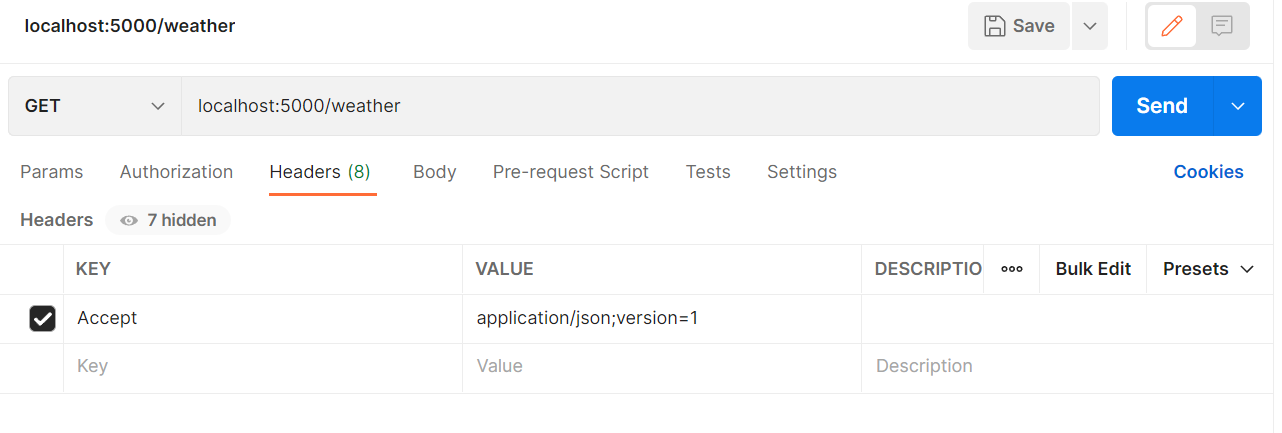
To use a custom header such as X-Api-Version we need to change the ApiVersionReader to:
builder.Services.AddApiVersioning(options =>
{
    options.ApiVersionReader = new HeaderApiVersionReader("X-Api-Version");
})
You can verify this in postman:
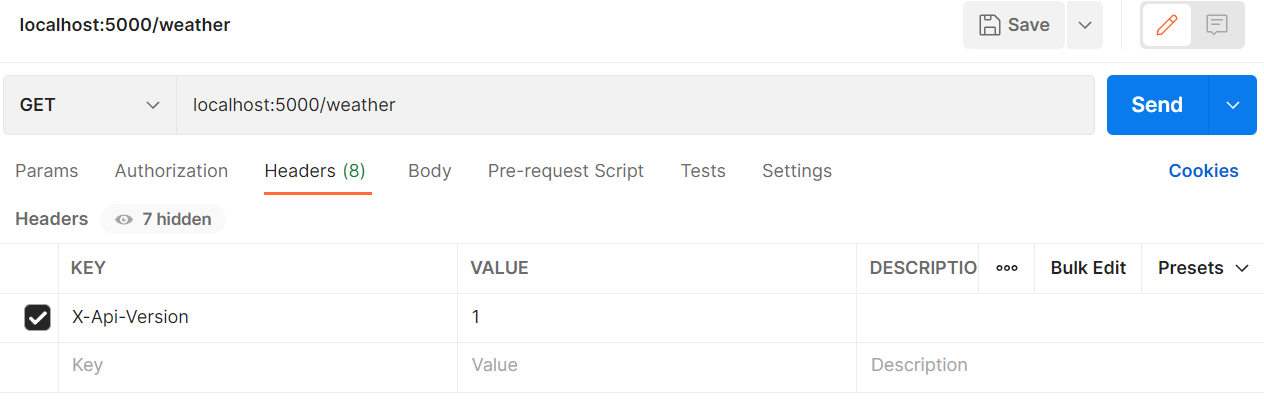
Versioning via QueryStrings
The next way of versioning our urls is to use a querystring parameter. Here we will change the type of ApiVersionReader to QueryStringApiVersionReader and pass in the name of the parameter that we will use as part of the querystring to provide the version information:
builder.Services.AddApiVersioning(options =>
{
    options.ApiVersionReader = new QueryStringApiVersionReader("version");
})
You can verify this in postman:
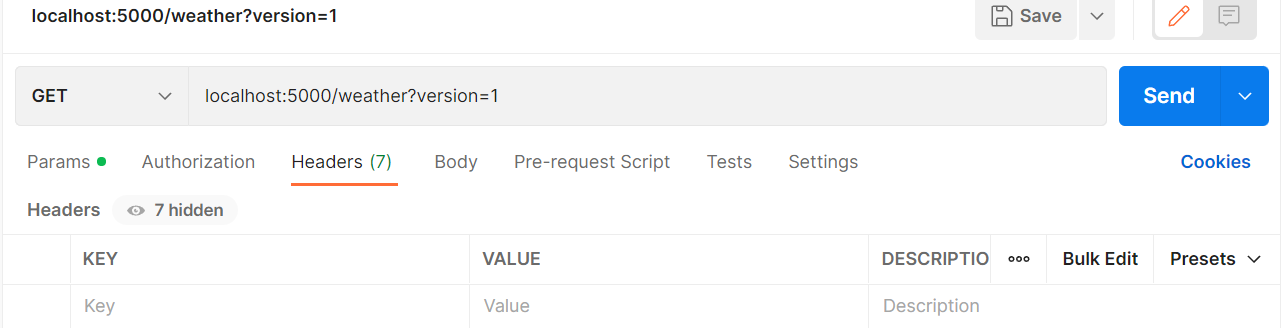
Versioning via URLs
The last major way of adding in versioning information is to use URLs. To add the version information to the URL we need to modify the route itself. Depending on your setup, this might be via the Route attribute or via the one of the HTTP attributes like HTTPGet. We add a new segment to our URL called version limited to the type apiVersion. This is a special validation that’s created by the versioning package to ensure that correct values are passed in and the correct actions are called.
[ApiController]
[ApiVersion(1.0)]
[ApiVersion(2.0)]
[Route("v{version:apiVersion}/weather")]
public class WeatherController : ControllerBase
{
    [HttpGet]
    public string Get( ApiVersion version ) => "Version " + version;

    [HttpGet, MapToApiVersion( 2.0 )]
    public string GetV2( ApiVersion version ) => "Version " + version;
}
Once this is setup for your application, the last bit that we need to do is change the ApiVersionReader in the versioning options. We use the type UrlSegementApiVersionReader to make the package read from the route data instead.
builder.Services.AddApiVersioning(options =>
{
    options.ApiVersionReader = new UrlSegmentApiVersionReader();
})
You can verify this in postman:
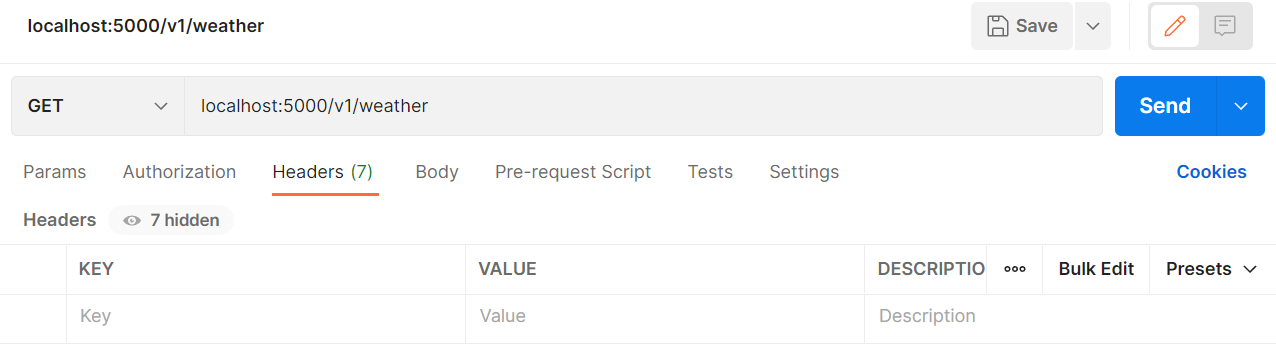
Accessing Versioning Information
For any of the versioning strategies that we’ve just been through, we may come across scenarios where we need to access the version that’s been requested by the user. One way to access this information is to go through the HTTPContext.
On each HTTP Context instance there is an extension method that we can invoke called GetRequestedApiVersion. If there is a version requested by the user, the method returns this as a ApiVersion instance, otherwise it returns null:
[HttpGet]
public string Get() => "Version " + Context.GetRequestedApiVersion()?.ToString();
Alternatively, for we can inject the version as a parameter:
[HttpGet]
public string Get( ApiVersion version ) => "Version " + version;
Other versioning options
There are other things that we can do with this package such as specifying the default version when one is not specified and reporting the supported and deprecated versions in our responses.
To set the default version, we would set the option AssumeDefaultVersionWhenUnspecified to true and then DefaultApiVersion to the default version that you wish to be assumed. Note, that this will only work if you are using the header or querystring versioning strategies.
We can also specify which versions are depreciated and which ones are not. There’s slightly different ways of doing this. In MVC APIs we would set the deprecated flag on the ApiVersion attribute that we decorate our controllers and actions with. For minimal APIs we call HasDepecatedApiVersion with the relevant version number on the version set that we are using. Once this is done, for both MVC and Minimal APIs we set ReportApiVersions equal to true in the options and start getting the headers api-deprecated-versions and api-supported-versions returned as part of responses. These headers contain a comma separated list of supported versions.
ASP.NET Core Versioning: Minimal APIs
The same versioning approaches (headers, querystrings, URLs) apply to Minimal APIs, but the setup differs. For Minimal APIs we need the Asp.Versioning.Http package from NuGet instead of Asp.Versioning.Mvc.
Here is the base setup for a Minimal API:
using Asp.Versioning;
using Asp.Versioning.Conventions;

var version1 = new ApiVersion(1);
var version2 = new ApiVersion(2);

var builder = WebApplication.CreateBuilder(args);
builder.Services.AddApiVersioning(options =>
{
    // We will change this later on
});

var app = builder.Build();

app.MapGet("weather", (HttpContext context) =>
{
    var apiVersion = context.GetRequestedApiVersion();

    return "Version " + apiVersion?.MajorVersion?.ToString();
});

app.Run();
Adding versions to Minimal APIs
The setup for a minimal API is a bit different to what we would normally do in the MVC world. First we need to create a version set which tells the API versioning subsystem which versions are available to be used. Here we can set some common options like whether to report API Versions or not:
var app = builder.Build();
var versionSet = app.NewApiVersionSet()
                    .HasApiVersion(version1)
                    .HasApiVersion(version2)
                    .Build();
From there we are versioning each endpoint by first calling WithApiVersionSet passing in our version set, before either mapping it to a specific version with MapToApiVersion or making it version agnostic with .IsApiVersionNeutral():
app.MapGet("weather", (HttpContext context) =>
{
    var apiVersion = context.GetRequestedApiVersion();

    return "Version " + apiVersion?.MajorVersion?.ToString();
})
.WithApiVersionSet(versionSet)
.HasApiVersions(new [] {version1, version2});
Once this setup is done, the ApiVersionReader configuration for headers, querystrings, and URL segments is exactly the same as described in the MVC sections above.
The one difference with URL-based versioning in Minimal APIs is how you define the route. Instead of changing an attribute, you edit the route information passed into MapGet, MapPut etc:
app.MapGet("v{version:apiVersion}/weather", (HttpContext context) =>
{
    var apiVersion = context.GetRequestedApiVersion();

    return "Version " + apiVersion?.MajorVersion?.ToString();
})
.WithApiVersionSet(versionSet)
.HasApiVersions(new [] {version1, version2});
You would then use the UrlSegmentApiVersionReader as described in the MVC section above to make the package read from the route data.