Deploying Next.js 15 Static Export to Cloudflare Workers with OpenTofu
At the start of this year I decided to rebuild my personal site from scratch. The old site was a Hugo static site hosted on GitHub Pages, and whilst it worked, it had accumulated years of SEO issues, a stale design, and a deployment process that consisted of me pushing to main and hoping for the best. I wanted something I could iterate on quickly, something that reflected the kind of infrastructure work I do professionally, and something that gave me full control over detail.
The result is this site. I fully rebuilt it using Next.js 15 static exports deployed to Cloudflare Workers, with all infrastructure managed by OpenTofu and a single GitHub Actions pipeline handling everything from linting through to production deployment. This post walks through how I set it up, what trade-offs I made, and what I would do differently.
Context and Motivation
I wanted to write more this year. Not just blog posts, but evergreen content that I could revisit and improve over time such as thoughts on architecture, engineering practices and cloud patterns. A lot of stuff changes in the world of software development but equally, there is a lot of stuff that doesn't change. Lastly, I also wanted to position myself for the future with a site that could serve as a professional portfolio so I wanted to add projects, open source contributions, video content, and services.
As part of some of the projects that I am building, I needed to learn more about modern SEO practises and some things that I have maybe glossed over before such as topical clusters and the like. So this was my opportunity to fix all of that during the migration rather than papering over it and pretending that it didn't exist. And honestly, I wanted to try this particular technology stack out. Although Having worked with Cloudflare and infrastructure-as-code professionally, building my personal site with the same tools felt like a good chance to try some things that I was less familiar with.
Architecture Overview
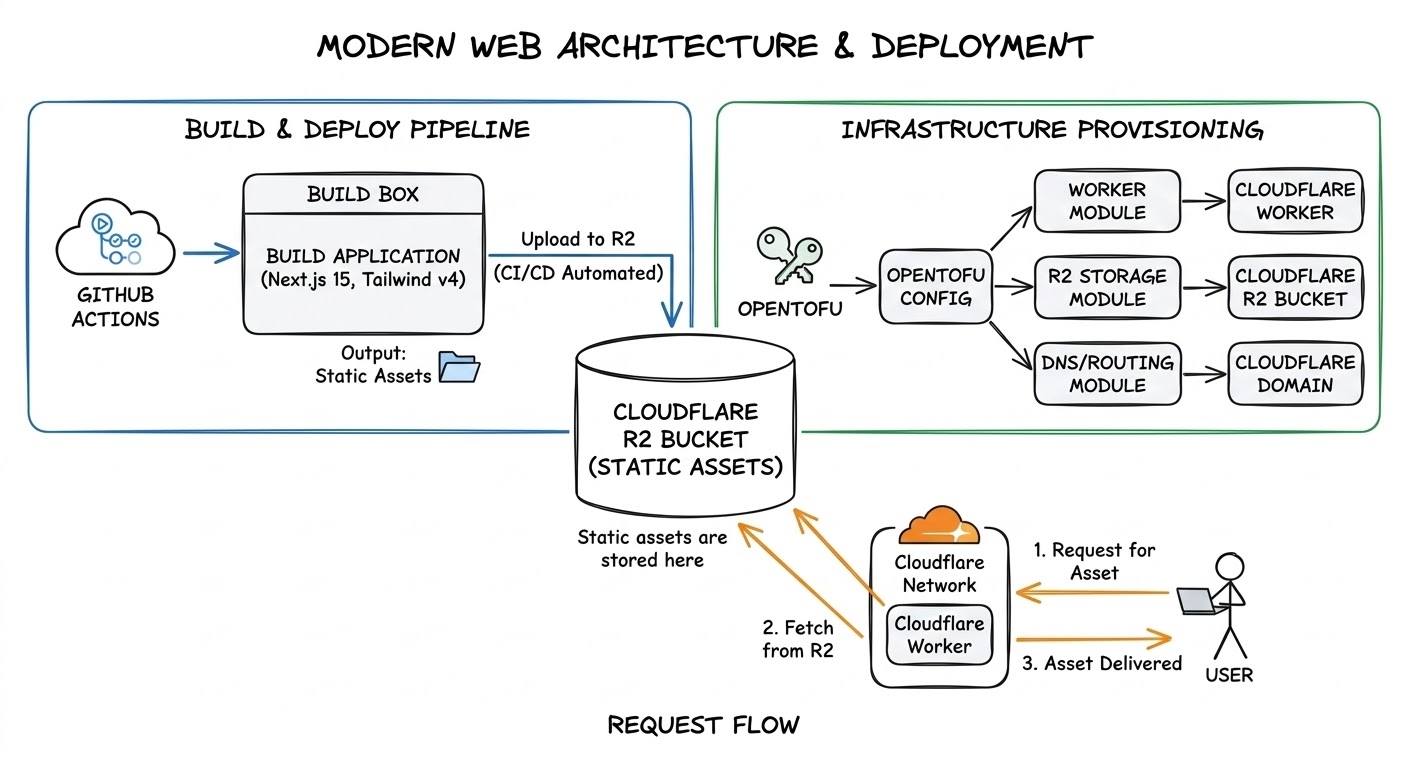
The architecture breaks down into four pieces:
- Next.js 15 with Tailwind CSS v4 for the frontend, exported as a fully static site
- Cloudflare Workers serving those static assets with a custom worker handling security headers, redirects, and legacy domain routing
- OpenTofu managing all Cloudflare infrastructure across three modules: DNS records, zone settings, and routing
- GitHub Actions orchestrating the entire pipeline from CI checks through to production deployment
There is no server-side rendering, edge functions, no database. The worker runs first on every request, applies security headers, handles redirects, and then falls through to static asset serving. Everything that would normally require a server, for example: OG images, sitemaps, RSS feeds, all get generated at build time.
Prerequisites
To follow along or replicate this setup, you will need:
- Node.js 22 and pnpm 9
- An OpenTofu installation
- A Cloudflare account with a registered domain
- A GitHub repository with Actions enabled
- A Cloudflare R2 bucket for OpenTofu state storage
Project Structure
The repository is a monorepo with three main directories:
codewithstu.tv/
  web/                  # Next.js 15 application
    content/            # MDX content (thoughts, videos, projects)
    scripts/            # Prebuild and postbuild scripts
    src/                # Application source code
    next.config.ts
    package.json
  worker/               # Cloudflare Worker
    src/
      index.ts          # Request handling, headers, redirects
      index.test.ts     # Worker tests via cloudflare:test
      redirects.ts      # Redirect map from compiled JSON
      redirects.json    # Migration redirect data
    wrangler.toml
  iac/                  # OpenTofu infrastructure
    10_dns/             # Zone and DNS record management
    15_zone_settings/   # TLS, HSTS, HTTP/3, security settings
    20_routing/         # Worker custom domains and routing
  .github/
    workflows/
      ci-cd.yml         # Single pipeline for everything
The numbering on the IaC directories is intentional as it reflects the dependency order. DNS must exist before zone settings can be applied, and zone settings must exist before routing can be configured. The pipeline enforces this ordering through job dependencies. It also limits the blast radius of any changes as domains and zones usually have cross functional purposes (eg: email handling).
Configuring Next.js 15 for Static Export
The Next.js configuration is deliberately minimal:
const nextConfig: NextConfig = {
  output: "export",
  images: {
    unoptimized: true,
  },
  trailingSlash: false,
};
output: 'export' is the main factor in the static export. The build produces a directory of static HTML, CSS, JS, and assets. Every dynamic route must have a generateStaticParams() function that enumerates all possible values at build time.
images: { unoptimized: true } disables Next.js Image Optimization, which requires a server. I use standard <img> tags throughout. For a static site, this is fine as the images are optimised during the build process and served directly from R2 when needed.
For tooling, I use pnpm as the package manager and Biome for both linting and formatting instead of the more common ESLint and Prettier combination. Biome is significantly faster and avoids the compatibility issues that come with ESLint 9 and eslint-config-next.
MDX as Zero-Client-JS Content
All written content on the site is MDX, rendered server-side at build time using next-mdx-remote/rsc. Compilation happens entirely on the server and ships zero client JavaScript for content rendering. The reader gets static HTML.
The MDX pipeline includes a few custom pieces worth mentioning. There is a remark plugin that rewrites relative image paths so that images can live alongside their MDX files in the content directory rather than in the public folder. There is also a custom anchor component that applies rel="nofollow noopener noreferrer" to external links by default, with an allowlist of trusted domains (GitHub, LinkedIn, YouTube) that get dofollow treatment. This is a small SEO detail, but it matters if you link out frequently or you have old content that may have their domains reused for nefarious purposes down the line.
The Prebuild Pipeline
The hidden cost of static export that does not get discussed enough is the fact that the site has five prebuild scripts and one postbuild script to compensate for actions that are normally dynamic:
Prebuild (runs before next build):
- GitHub data fetching: pulls repository metadata for my open-source projects directly from the GitHub's API and caches it to
data/repos.jsonto avoid rate limits during development - Sitemap generation: produces both a standard
sitemap.xmland a video sitemap with Google video schema for the video content pages - RSS feed generation: creates a combined feed plus per-type and per-cluster feeds, so readers can subscribe to just architecture posts or just .NET content
- Content image copying: copies images from MDX content directories into the public output folder
- OG image generation: uses Satori and Resvg to render React components to PNG at build time, producing unique Open Graph images for every page on the site
Postbuild (runs after next build):
- Font preload injection: walks every HTML file in the output directory and injects
<link rel="preload">tags for the font files, because Next.js static export does not handle this automatically
The font preload injection script is the most illustrative example of the kind of workaround static export requires. Next.js adds font preload hints when running in server mode, but the static export strips them. This script walks every HTML file in the build output and injects them back:
const OUT_DIR = path.join(import.meta.dirname, "..", "out");

// Find primary font subsets (marked with .p. by next/font)
const fontFiles = globSync("_next/static/media/*-s.p.woff2", { cwd: OUT_DIR });

if (fontFiles.length === 0) {
  console.warn("No .p.woff2 font files found — skipping font preload injection");
  process.exit(0);
}

const preloadTags = fontFiles
  .map(
    (f) =>
      `<link rel="preload" as="font" type="font/woff2" crossorigin="anonymous" href="/${f}"/>`,
  )
  .join("");

// Inject into all HTML files
const htmlFiles = globSync("**/*.html", { cwd: OUT_DIR });
let injected = 0;

for (const htmlFile of htmlFiles) {
  const filePath = path.join(OUT_DIR, htmlFile);
  const content = fs.readFileSync(filePath, "utf-8");
  if (content.includes(preloadTags)) continue;

  const updated = content.replace("<head>", `<head>${preloadTags}`);
  if (updated !== content) {
    fs.writeFileSync(filePath, updated);
    injected++;
  }
}
Each of these scripts replaces something that a server-rendered Next.js site would handle at request time. The trade-off is longer build times in exchange for zero runtime overhead and a simpler serving infrastructure. I could switch to anything that statically hosted websites in a matter of seconds if needed.
CI/CD Pipeline with GitHub Actions
The entire pipeline lives in a single workflow file. On pull requests, it runs CI checks in parallel. On pushes to main, it runs CI, builds, deploys, and applies infrastructure changes in sequence.
The CI stage uses a matrix strategy to run lint, typecheck, and test jobs in parallel for both the web application and the worker:
web-ci:
  strategy:
    matrix:
      task: [lint, typecheck, test]

worker-ci:
  strategy:
    matrix:
      task: [lint, typecheck, test]
That gives six parallel CI jobs. The deploy job is where the two halves of the monorepo come together. It waits for all CI jobs plus the DNS infrastructure job, builds the Next.js application, copies the static output into the worker's public directory, and deploys everything as a single unit using the official Wrangler action:
deploy:
  name: Build & Deploy
  needs: [web-ci, worker-ci, iac-dns]
  if: github.event_name != 'pull_request'
  runs-on: ubuntu-latest
  steps:
    - uses: actions/checkout@v4
    - uses: pnpm/action-setup@v4
      with:
        version: 9
    - uses: actions/setup-node@v4
      with:
        node-version: 22
        cache: pnpm
        cache-dependency-path: |
          web/pnpm-lock.yaml
          worker/pnpm-lock.yaml
    - name: Install web dependencies
      run: pnpm --dir web install --frozen-lockfile
    - name: Build web
      run: pnpm --dir web build
    - name: Copy static assets to worker
      run: |
        mkdir -p worker/public
        cp -r web/out/* worker/public/
    - name: Install worker dependencies
      run: pnpm --dir worker install --frozen-lockfile
    - name: Deploy to production
      if: github.ref == 'refs/heads/main'
      uses: cloudflare/wrangler-action@v3
      with:
        apiToken: ${{ secrets.CLOUDFLARE_API_TOKEN }}
        accountId: ${{ secrets.CLOUDFLARE_ACCOUNT_ID }}
        workingDirectory: worker
        command: deploy --env production
The cp -r web/out/* worker/public/ step is the key line. It takes the entire Next.js static export and drops it into the worker's asset directory, so the worker serves it as if it were a single deployable unit.
The IaC jobs run in dependency order: 10_dns first, then 15_zone_settings and deploy in parallel (since neither depends on the other), and finally 20_routing which depends on the worker being deployed. Environment selection is automatic. Pushes to main deploy to production, everything else targets dev.
For managing secrets, there is a setup.ps1 script that configures all the required GitHub Actions secrets and Cloudflare API tokens. This was a one time setup and means that I don't store the access keys anywhere.
Provisioning Cloudflare with OpenTofu
The infrastructure is split into three modules, each with its own state file and its own apply step in the pipeline.
DNS Records
The 10_dns module manages the Cloudflare zone and all DNS records. Rather than defining each record as a separate resource, the records are defined as a typed map in .tfvars files:
resource "cloudflare_dns_record" "records" {
  for_each = var.dns_records

  zone_id  = cloudflare_zone.main.id
  type     = each.value.type
  name     = each.value.name
  content  = each.value.content
  proxied  = each.value.proxied
  ttl      = each.value.ttl
  priority = each.value.priority
  comment  = each.value.comment
}
This single resource definition handles everything: ProtonMail DKIM, MX, and SPF records; DMARC policy; Bluesky domain verification; Google Search Console verification; and the actual site records. Adding a new DNS record is a one-line addition to the tfvars file.
Zone Settings
The 15_zone_settings module configures the Cloudflare zone with security and performance settings that apply to all traffic. This includes strict SSL mode, minimum TLS 1.2, TLS 1.3 enabled, HSTS with preload (max-age of one year, including subdomains), HTTP/3, Brotli compression, 0-RTT, and Early Hints. These are all settings that you would typically configure through the Cloudflare dashboard. Putting them in code means they are version controlled, reviewable, and reproducible.
Routing and Custom Domains
The 20_routing module binds custom domains to the worker. The interesting bit here is the legacy domain handling:
resource "cloudflare_workers_custom_domain" "legacy" {
  for_each = var.legacy_domains

  account_id = var.account_id
  hostname   = each.value.hostname
  service    = var.worker_name
  zone_id    = each.value.zone_id
}
This binds the old im5tu.io domain to the same worker that serves codewithstu.tv. The worker then handles the routing logic, redirecting migrated content and returning 410 Gone for retired content.
R2 as State Backend
All three modules store their state in a Cloudflare R2 bucket using the S3-compatible backend. This keeps everything within Cloudflare rather than depending on AWS S3 or Terraform Cloud. The backend configuration requires several skip_* flags because R2 does not implement the full S3 API:
backend "s3" {
  bucket                      = "codewithstu-tv-state"
  region                      = "auto"
  skip_credentials_validation = true
  skip_metadata_api_check     = true
  skip_region_validation      = true
  skip_requesting_account_id  = true
  skip_s3_checksum            = true
  endpoints = {
    s3 = "https://...r2.cloudflarestorage.com"
  }
}
Environment isolation is handled through dynamic state keys. The CI pipeline passes a different backend key depending on the target environment, so dev and prod state files live in the same bucket but never interfere with each other.
The Worker as Middleware
The worker is the most important piece of the architecture after Next.js itself. Setting run_worker_first = true in wrangler.toml means that every single request, including requests for static assets, passes through the worker before anything else happens. This is what gives full control over response headers, redirect behaviour, and host-based routing.
name = "codewithstu-tv-hosting"
main = "src/index.ts"
compatibility_date = "2026-02-17"

[assets]
directory = "./public/"
binding = "ASSETS"
not_found_handling = "404-page"
run_worker_first = true

[env.dev]
name = "codewithstu-tv-hosting-dev"

[env.dev.vars]
ENVIRONMENT = "dev"

[env.production]
name = "codewithstu-tv-hosting-prod"

[env.production.vars]
ENVIRONMENT = "production"
The [assets] block binds the static output directory and run_worker_first = true is the critical setting. Without it, Cloudflare serves static assets directly and the worker only handles unmatched routes. With it, the worker intercepts every request before static asset serving occurs.
Security Headers
Every response that leaves the worker gets a full set of security headers applied:
const SECURITY_HEADERS: Record<string, string> = {
  "Content-Security-Policy": [
    "default-src 'self'",
    "script-src 'self' 'unsafe-inline' https://datafa.st",
    "style-src 'self' 'unsafe-inline'",
    "img-src 'self' https://i.ytimg.com data:",
    "font-src 'self'",
    "connect-src 'self' https://datafa.st",
    "frame-src https://www.youtube.com",
    "frame-ancestors 'none'",
    "base-uri 'self'",
    "form-action 'self'",
    "object-src 'none'",
    "upgrade-insecure-requests",
  ].join("; "),
  "X-Content-Type-Options": "nosniff",
  "X-Frame-Options": "DENY",
  "Referrer-Policy": "strict-origin-when-cross-origin",
  "Permissions-Policy":
    "camera=(), microphone=(), geolocation=(), payment=(), usb=(), browsing-topics=()",
  "Cross-Origin-Opener-Policy": "same-origin",
  "Cross-Origin-Resource-Policy": "same-origin",
  "X-XSS-Protection": "0",
};
The CSP is as strict as I could make it whilst still allowing the site to function. YouTube embeds need frame-src, the analytics script needs script-src and connect-src, and unsafe-inline is unfortunately required for the way Tailwind CSS and GSAP inject styles. Everything else is locked down.
Host-Aware Routing
The worker inspects the hostname of every incoming request. If it comes from the legacy im5tu.io domain, the worker checks the redirect map first. If the path has a redirect entry, it follows it either a 301 to the new location on codewithstu.tv (preserving query strings) or a 410 Gone for retired content. If the path is the root, it 301s to the new homepage. For any other path on the legacy domain with no redirect entry, it returns 410.
The distinction between 301 and 410 is deliberate. A 301 tells search engines to transfer link equity to the new URL. A 410 tells them the content is intentionally gone and they should remove it from the index. Using 404 for retired content would leave search engines guessing whether the content might come back.
The full routing logic in the worker's fetch() handler looks like this:
export default {
  async fetch(request: Request, env: Env): Promise<Response> {
    const url = new URL(request.url);
    const isLegacy = LEGACY_HOSTS.includes(url.hostname);
    const isProduction = PRODUCTION_HOSTS.includes(url.hostname);

    // Check redirect map first (works for both legacy and current domains)
    const redirect = getRedirect(url.pathname);
    if (redirect) {
      if (redirect.status === 410 || redirect.destination === null) {
        return withSecurityHeaders(new Response("Gone", { status: 410 }), isProduction);
      }
      const dest = isLegacy
        ? `${NEW_ORIGIN}${redirect.destination}${url.search}`
        : `${redirect.destination}${url.search}`;
      return withSecurityHeaders(
        new Response(null, { status: 301, headers: { Location: dest } }),
        isProduction,
      );
    }

    // Legacy domain catch-all: root gets 301, everything else gets 410
    if (isLegacy) {
      if (url.pathname === "/") {
        return withSecurityHeaders(
          new Response(null, { status: 301, headers: { Location: `${NEW_ORIGIN}/` } }),
          isProduction,
        );
      }
      return withSecurityHeaders(new Response("Gone", { status: 410 }), isProduction);
    }

    // Non-production: override robots.txt
    if (!isProduction && url.pathname === "/robots.txt") {
      return withSecurityHeaders(
        new Response("User-agent: *\nDisallow: /\n", {
          headers: { "Content-Type": "text/plain" },
        }),
        isProduction,
      );
    }

    // Fall through to static assets
    const response = await env.ASSETS.fetch(request);
    return withSecurityHeaders(response, isProduction);
  },
} satisfies ExportedHandler<Env>;
Redirect Map as Compiled Data
The redirect data lives in a JSON file that gets bundled with the worker at build time. At module initialisation, the JSON is loaded into a Map for O(1) lookups:
const redirectMap = new Map<string, RedirectEntry>();
for (const entry of redirectsData as RedirectEntry[]) {
  redirectMap.set(normalizePath(entry.source), entry);
}
This is a deliberate choice over alternatives like KV lookups or a separate redirect service. The redirect map is small enough to fit in memory, the lookups are fast, and there is no external dependency to fail. The trade-off is that adding a redirect requires a worker redeployment, which for a personal site is perfectly acceptable.
Testing the Worker
The worker has a test suite using Vitest with the cloudflare:test module, which provides utilities for creating mock execution contexts and environments. The tests cover security header presence, redirect behaviour, legacy domain handling, and the robots.txt override logic. Having these tests in place means I can refactor the worker with confidence that the externally observable behaviour remains correct.
Security Hardening a Static Site
One thing I wanted to get right with this build was security. Most static site deployment guides skip this entirely, assuming that a static site has no attack surface. That is not quite true as there are still XSS vectors through embedded content, clickjacking risks, and information leakage through overly permissive headers.
The security model here is three layers deep:
Worker layer: The CSP, COOP, CORP, Permissions-Policy, X-Frame-Options, and X-Content-Type-Options headers described above. These are applied to every response regardless of content type. This is the broadest layer of defence and handles the majority of browser-side security concerns.
Zone layer: Managed through OpenTofu in the 15_zone_settings module. HSTS with preload ensures browsers never make a plaintext HTTP request to the site. Minimum TLS 1.2 drops support for older, weaker protocol versions. Strict SSL mode ensures the connection between Cloudflare and the origin (in this case the worker) is always encrypted and validated.
Application layer: Within the Next.js application itself, there are three specific defences. The content loading functions in lib/content.ts validate slugs to prevent path traversal. This matters because content paths are derived from URL segments. The YouTube embed component validates video IDs against a strict regex (/^[a-zA-Z0-9_-]{11}$/) before rendering an iframe. And the safeJsonLd() utility in lib/utils.ts escapes < characters in JSON-LD structured data to prevent script injection via search engine markup.
Migrating from Hugo
The previous site was built with Hugo and hosted on GitHub Pages at im5tu.io. The migration needed to preserve as much SEO value as possible while moving to a completely different URL structure on a new domain.
The Redirect Strategy
I went through every page on the old site and classified it into one of three buckets:
- Migrated content: These are articles and guides that were worth keeping. These get 301 redirects from the old URL to the new one on codewithstu.tv. The redirect map preserves query strings so that any deep links with tracking parameters continue to work.
- Retired content: These are pages that were outdated or no longer relevant. These return 410 Gone, which is an explicit signal to search engines that the content has been intentionally removed and should be deindexed.
- Catch-all for unknown paths: This is anything on the legacy domain that does not match a redirect entry gets 410. This prevents soft 404s from accumulating in search console.
The redirect data is maintained as a JSON file in the worker directory. Each entry has a source path, an optional destination path, and a status code (301 or 410). The worker loads this into a Map at startup and checks it on every request. With all of this done, I could leverage Google Search Consoles Change Of Address Tool functionality once completed.
Sitemap and Robots
The sitemap is regenerated at build time by a prebuild script that walks all content directories and produces both a standard sitemap and a video sitemap. After the migration, I submitted the new sitemaps through Google Search Console to accelerate the reindexing process.
The robots.txt is also generated at build time, with the dev override ensuring that non-production environments always serve a disallow-all robots.txt regardless of what the build produces.
Performance Results and Static Export Tradeoffs
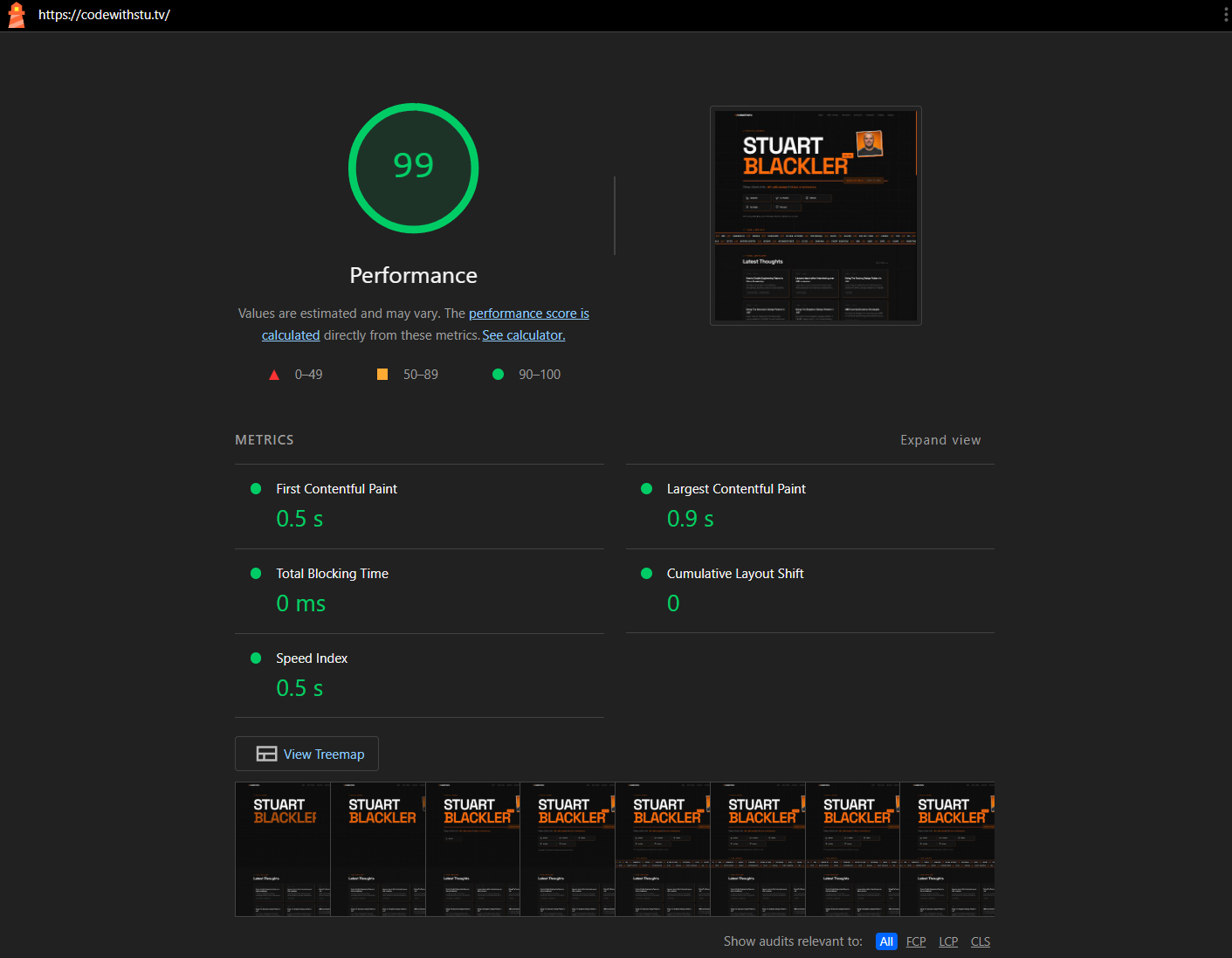
A fully static site served from a Cloudflare Worker at the edge should be fast. And it is. Lighthouse scores consistently hit 99-100 for performance, with a 0.5s First Contentful Paint, 0.9s Largest Contentful Paint, zero Total Blocking Time, and zero Cumulative Layout Shift. But the site is not as lightweight as I expected.
Next.js ships a runtime even for static exports. The framework JavaScript includes the router, prefetching logic, and hydration code. For a site that is fundamentally a collection of static pages, this feels like unnecessary weight. The content pages ship zero client JavaScript thanks to the RSC MDX pipeline, but the framework shell is always there.
GSAP adds to this. The animations on the site were beautiful and add character, but every animation library is additional JavaScript that the browser must parse and execute. So this is something I ultimately removed. The animations I had could be replaced with CSS animations for the simpler transitions.
If I were starting again today, I would seriously consider whether Next.js is the right choice for a static-only site. I don't believe there is a real gap in the market for a serious frontend only framework - not one that wants to be a backend framework as well as I feel that's where a lot of confusion and mistakes happen.
Conclusion
The biggest question I find myself answering is the question of whether it was worth it for time/tokens used. I think so. I think the site looks substantially better than it did before and I learnt things about a stack that I'm less familiar with (Cloudflare workers). In hindsight, the setup could have been different and there was purpose behind each technology stack chosen. But most of all, it's a personal project and I had fun doing it. We've lost our joy programming a bit I feel, and we should be going back to tinkering and playing with things we wouldn't normally. Code isn't the bottleneck anymore, it's our ability to think.